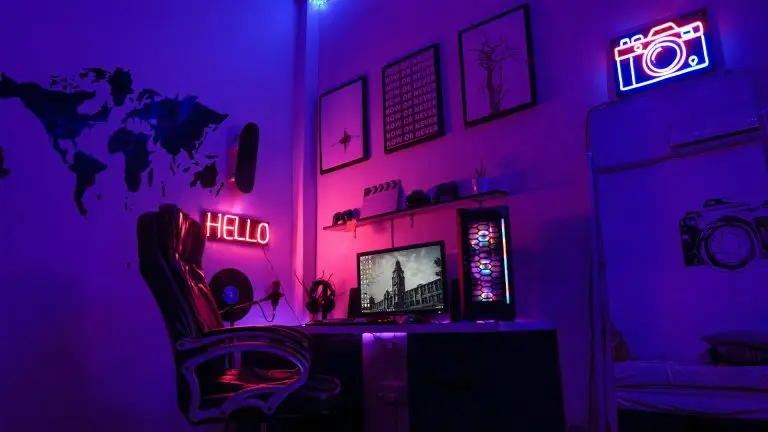
It goes the same way for every gaming room at its inception: an ergonomic computer chair put against the nearest wall, the monitor moved from the previous setup, and ceiling lights that cast a glare right into your eyes as soon as evening arrives.
At least, until the pain in your neck starts kicking in after two hours of gameplay. A proper gaming room does not require much funding, but it does require thorough planning.
This article outlines steps for designing your gaming space.
Starting from the Layout
The placement of a desk lays the groundwork for everything else. It is recommended not to sit by the window since your eyes constantly adapt between the window outside and your computer screen. If you place it with the window behind your back, the reflections from it will also cause some strain. It is better to sit opposite the side wall.
Make sure that you can move about a meter (around three feet) back from your chair without colliding with anything. If you stream from a room where you sleep, it would be reasonable to place the desk in a way that keeps the bed out of the camera’s frame.
Organize the zones of the room. The second gaming area may consist of a couch or a beanbag in front of the TV for playing consoles.
Making the Ergonomic Setup
In an ergonomic setup, your body is the one which defines the layout of your workplace rather than vice versa. Try placing the upper part of the monitor either at the level of your eyes or a bit lower, at arm’s length from you.
Keep your elbows near 90 degrees and your feet on the floor. An ordinary desk has a height of around 73 to 76 cm (29 to 30 inches), but in the case of a height-adjustable computer table, you can set it precisely the way you wish.
Buy a chair beforehand, not RGB lighting. An ordinary office chair with adjustable back support is usually better for prolonged play than an ergonomic racing chair.
Planning the Multilayer Lighting
Gaming in pitch-dark conditions with a bright monitor strains your eyes. Also, a single ceiling light creates a glare on the screen. The solution is to organize the lighting system in layers:
- Ambient Light: Dimmable ceiling lights or lamps to illuminate the room.
- Bias Lighting: The LED strip attached to the back of your monitor or TV, set at around 6500K color temperature. It decreases the difference in luminosity between the wall and the screen and makes the dark areas more detailed.
- Accent Lighting: The RGB LED strips or panels, as well as a desk lamp. You can set special scenes in the smart bulbs’ app, such as a scene for horror games at night.
If you do stream, place a gentle key light in front of you and a little above eye level. You should not depend on a monitor’s glow for it.
Cabling and Audio
The cables gather very fast. A cable tray underneath the table, the Velcro straps for the wires, and the surge-protected power strip mounted out of the camera’s sight will solve the cable problem in an afternoon.
The hard walls and smooth floor cause sound reflections and interfere with the positional audio for shooters. They also affect recordings with a microphone, which will sound like an empty cave. A rug, curtains, and books on shelves will noticeably decrease the reverberation. Foam panels will diminish the echo, but they cannot eliminate it completely.
Network Setup
Internet games require a stable ping more than a fast download speed. Wherever possible, plug in an Ethernet cable (Category 6 is fine enough at home) rather than using Wi-Fi. If the wired connection is not viable, the Wi-Fi 7/6E router with the shortest path from it to your rig, or the Wi-Fi 7/6E mesh node positioned within or next to the gaming area, will help reduce lags.
The connection requires protection as well, and many gamers tend to employ a virtual private network (VPN) for that. It encrypts your data, sending it via the server situated elsewhere, thus masking your IP address. This way, a gamer becomes less prone to becoming an objective of a DDoS attack, an issue encountered by streaming and competing gamers.
Using the VPN service also ensures extra protection when connecting to the networks other people can use or when your data security may be put at stake otherwise. The VPN will affect your latency in a minor but still existing way; therefore, use providers who have a number of servers nearby and fast protocols like WireGuard, and always consider the game policies regarding the software.
Adding the Finishing Touches
Having completed the basic elements of your gaming space, try decorating it the way you find appropriate. Use wall shelves for placing consoles and other items without cluttering the desk. A headset hanger saves up more space as well.
Plants are able to endure relatively little light in the gaming room. PCs and consoles generate a significant amount of heat, so you need to ensure air circulation inside the room during hot summer days.
Conclusion
A perfect gaming room requires making several decisions in the correct order: placing the desk to avoid glare, fitting the gaming setup to your needs, planning multilayer lighting, managing cables and sound, and building your network. When doing it properly, decorating your gaming space becomes easy and joyful. Start by making the gaming zone and try living with it for a week.