No Subscription Indoor Camera: A Smart Home Security Guide
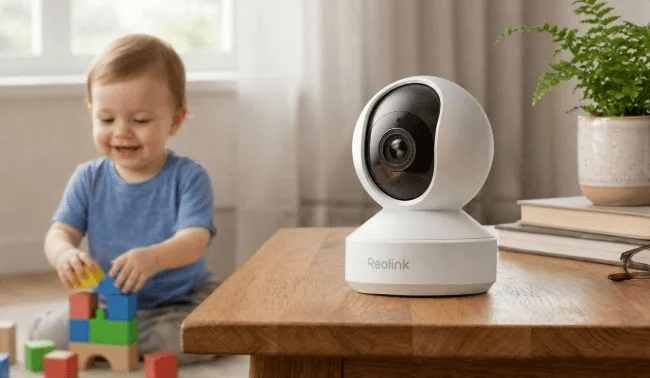
An indoor camera with no subscription saves users from a recurring fee. They can use the camera fully without paying any monthly or yearly charges. It’s affordable and convenient.
Let’s understand what an indoor security camera with no subscription is and how it works. We will explain its features and how you can buy the right camera for yourself.
What Is an Indoor Camera Without a Subscription?
An indoor camera without subscription is a security camera that offers primary features, such as live viewing, real-time alerts, smart detection, and two-way audio without requiring any monthly or annual fee.
Most subscription-free indoor cameras store videos in local storage, such as microSD card, NVR, Home Hub, etc. However, storage options depend on the camera model.
What to Look for in the Best Indoor Camera Without a Subscription?
No-Subscription Features
Often, security cameras only offer basic features, such as event recording, without a subscription. You must subscribe to get access to the advanced functions. So, look at the camera’s no-subscription features. It should offer the core functions, such as the live feed, two-way audio, real-time alerts, and smart detection with no restrictions.
Local Storage Options
The local storage options in indoor cameras without a subscription vary by model. Some cameras support only a microSD card, while some support a microSD card or NVR. Also, check the maximum microSD card capacity, such as 128GB, 256GB, or 512GB, and NVR compatibility.
There can be multiple local storage options, such as an SD card, NVR, Home Hub, FTP server, or NAS. Depending on your feasibility, you can opt for the right camera. For optimal convenience, you can go with a microSD card. But if you already have an NVR, FTP server, or NAS, you can select the camera accordingly.
Smart Detection
The indoor camera should have an on-device smart detection system. It works without any recurring fees and processes videos locally. It helps the camera detect people and pets and distinguish between them. Once an object is detected, it sends real-time alerts to the connected devices. Therefore, users get to know about every activity. It also reduces false alerts through AI recognition, which is quite accurate.
Video Quality
You should look at three important specifications: resolution/frame rate, field of view, and night vision. For optimal results, opt for 4K or higher resolutions as they offer rich details and optimal clarity. Do not go lower than 2K (5MP). The frame rate should be higher than 15 for a smooth viewing experience.
Check the field of view to get a better idea of the area the camera can cover. To capture clear videos at night, the camera should have night vision. If you want no-disturbance night vision, go with infrared. But if you have no issues with spotlights, you can go with color night vision. Often, indoor cameras have both.
Best Indoor Cameras Without a Subscription for Different Needs
Best for Everyday Home Monitoring: Reolink E1 Pro
Reolink E1 Pro is a subscription-free indoor security camera for everyday home monitoring. You can place it on your table or move it wherever you want to monitor a specific area. With pan-and-tilt movement, you can cover 360° and monitor the whole space.
If there is any object around, it automatically detects it and tracks the motion. It helps in monitoring every activity with real-time alerts. Secondly, you can monitor all day. It has a 3K 5MP lens that captures exceptional details. The F1.6 aperture helps capture clear videos at night.
Best for Pet Monitoring: Reolink E1 Zoom
Reolink E1 Zoom is an indoor security camera for hassle-free pet monitoring. With this, you can keep an eye on the pet area, food, and the surrounding area, as it captures a 360° view. It instantly detects a pet’s movements and sends real-time alerts. For specific areas where your pet roams, you can set up to 64 preset points for quick viewing.
It records videos in 4K Ultra HD resolution and allows you to zoom up to 3X to take a close-up view. Thus, you can monitor your pet’s activities closely. Even in low-light conditions, its infrared night vision records clear videos without disturbing the pet.
Best for Large Rooms: Reolink Duo 3 PoE
For large areas, the Reolink Duo 3 PoE is a reliable option. It’s equipped with dual lenses that cover a 180° area continuously. It captures every motion in the area and summarizes a 15s video in only one picture for quick monitoring.
Even though it covers a large area, the 16MP resolution ensures optimal detail and clarity. It does not miss the rich details of people and pets around. At night, it uses color or infrared night vision to offer clear videos. You can also customize motion zones for better security of a large area and to reduce false alerts.
Where Can You Use an Indoor Camera Without a Subscription?
Living Room: The camera in the living room records the activities of the children, pets, house help, and family members.
Entryway: It is a perfect location to capture incoming visitors. Whether they are family members, indoor delivery guys, or service providers.
Nursery: An indoor camera can work as a monitor to keep an eye on the baby 24/7. It records every activity, sends real-time alerts, and even detects crying.
Pet Area: The camera helps in monitoring pets even if you are away. You can monitor their habits and train them well.
Home Office: For safeguarding documents, preventing unauthorized access, or ensuring overall room security, you can use an indoor camera in the home office. It records all activities.
Garage: To keep track of vehicles and ensure security, you can install an indoor camera in the garage. You can see the vehicles from any location and get real-time updates about activities.
Indoor Camera With Subscription vs. No Subscription
An indoor camera with subscription requires a monthly recurring fee. You have to keep the subscription active to enjoy the advanced features like motion detection, real-time alerts, two-way audio, etc. Without an active subscription, its performance is limited.
On the other hand, a no-subscription camera does not need any recurring fee. Once you buy it, you can use it, store videos in local storage, and benefit from all features.
| Features | With Subscription | Without Subscription |
| Storage | Cloud | Local storage (microSD card, NVR, Home Hub, FTP server, or NAS) |
| Monthly cost | $5 to $15 per month | None |
| Privacy | Risky, as videos are stored on third-party servers | Owner has full control over the video |
| Offline Performance | Does not record offline | Works without internet |
| Recording type | Mostly event-based | 24/7 continuous recording and event-based recording |
| AI Detection | Requires active subscription | Works without subscription |
FAQs
Can I use a camera without a subscription?
Yes, you can use Reolink security cameras without any subscription. They offer all advanced features, including smart detection, real-time alerts, live feed, and two-way audio without any recurring fee.
Are there home security systems that don’t require a monthly fee?
Reolink home security systems do not require a monthly fee. Just buy once, store videos in local storage, and get access to all features.
What security cameras don’t require monthly payments?
Reolink security cameras do not require monthly or yearly payments. You can store videos in local storage and access them whenever you want.
Conclusion
An indoor camera without a subscription is a preferred choice for homeowners. It does not require any monthly fee or recurring charges. Users just need to pay once for the security camera. Later, they can store videos in their preferred local storage and get access to all the features the camera has. It’s an affordable, convenient, and hassle-free security option for indoor spaces.